

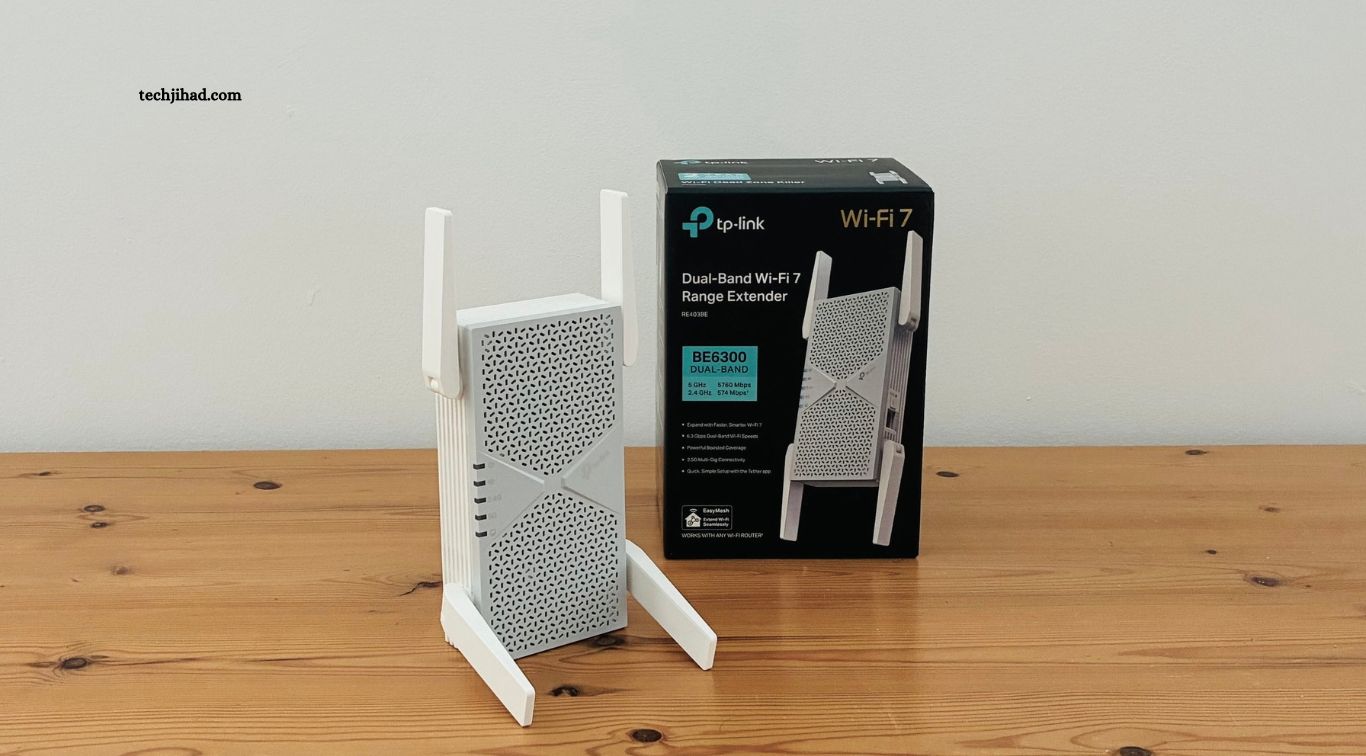
TP-Link BE10000 Wi-Fi 7 Range Extender brings high-speed wireless connectivity to areas where traditional routers struggle to provide reliable coverage. Designed for modern homes with multiple connected devices, this tri-band extender combines Wi-Fi 7 technology, advanced wireless features, and a multi-gigabit Ethernet port. It aims to improve connectivity for gaming, streaming, video calls, and other bandwidth-intensive activities.
The device, identified as the RE653BE, supports three frequency bands and offers a combined theoretical wireless speed of up to 10.2 Gbps. Its compatibility with existing Wi-Fi generations also allows users to expand their networks without necessarily replacing their current routers. With features such as Multi-Link Operation, EasyMesh compatibility, and 2.5 Gbps wired connectivity, TP-Link targets households looking for stronger and more flexible wireless coverage.
Read More: Camp Snap 110 Brings Simple Digital Photography Back
Wi-Fi 7 Technology Delivers Faster Wireless Performance
The TP-Link BE10000 extender uses the latest Wi-Fi 7 standard, also known as IEEE 802.11be. This technology introduces improvements in wireless speed, network capacity, and responsiveness compared with previous Wi-Fi generations. Its tri-band configuration supports 2.4 GHz, 5 GHz, and 6 GHz connections, allowing compatible devices to use different frequency bands according to their requirements.
TP-Link lists maximum theoretical speeds of 688 Mbps on 2.4 GHz, 4,320 Mbps on 5 GHz, and 5,188 Mbps on 6 GHz. Combined, these figures provide the BE10000 classification of approximately 10.2 Gbps. Actual performance depends on the connected router, client devices, distance, interference, and network conditions. TP-Link’s official product page provides the complete specifications.
Tri-Band Connectivity Helps Reduce Network Congestion
One of the main advantages of the BE10000 extender is its three-band wireless design. The 2.4 GHz band offers broader compatibility and can work well for basic connected devices, while the 5 GHz band supports faster connections for everyday activities. The 6 GHz band provides additional wireless spectrum for compatible devices, helping reduce competition with older equipment operating on traditional frequency bands.
This arrangement can benefit homes where several people use the internet simultaneously. Smart televisions, gaming systems, laptops, smartphones, and smart home products can place considerable demands on a wireless network. By supporting three frequency bands, the extender provides more flexibility for distributing network traffic. However, users need compatible devices to take full advantage of newer 6 GHz capabilities.
Multi-Link Operation Improves Connection Efficiency
Multi-Link Operation, commonly called MLO, is an important Wi-Fi 7 feature included in the TP-Link BE10000. It allows compatible devices to use multiple wireless links across supported frequency bands. This can improve connection efficiency, increase throughput, and help reduce latency under suitable network conditions.
The feature may be particularly useful for activities that require responsive connections, including online gaming, high-quality video streaming, and demanding wireless applications. However, MLO benefits depend on support from both the extender and connected devices. Older smartphones, computers, and other Wi-Fi clients may continue using their supported wireless standards without receiving the full advantages of this technology.
320 MHz Channels and 4K-QAM Support
The BE10000 supports 320 MHz channel bandwidth on the 6 GHz band, providing wider channels for transferring more data. Compared with narrower channel configurations, wider bandwidth can increase potential wireless throughput when compatible devices and suitable network conditions are available. This makes the extender attractive to users who want to take advantage of newer Wi-Fi 7 hardware.
The device also supports 4K-QAM, a modulation technology designed to carry more data within each wireless transmission. Multi-RU support further improves how wireless resources can be allocated across connected devices. Together, these technologies help improve network efficiency, although real-world performance still depends on signal quality, distance, interference, and client compatibility.
2.5 Gbps Ethernet Port Supports Wired Devices
Wireless connectivity is not the only important feature of the TP-Link BE10000. The RE653BE includes a 2.5 Gbps Ethernet port, allowing users to connect compatible devices through a wired network connection. This can be useful for desktop computers, gaming consoles, smart televisions, and other equipment that benefits from a stable connection.
The Ethernet port also supports access point mode. In this configuration, users can connect the extender to a router through an Ethernet cable and use it to provide tri-band wireless connectivity in another area. This setup can offer a more dependable connection than repeating a wireless signal, particularly when a suitable cable connection is available.
EasyMesh Compatibility Extends Whole-Home Coverage
The BE10000 supports TP-Link EasyMesh-compatible networking, helping users create a more unified wireless experience with supported routers and networking devices. Instead of managing separate wireless networks throughout the home, compatible equipment can use one Wi-Fi name and support smoother movement between coverage areas.
This feature can be useful in larger homes where a single router cannot provide reliable coverage in every room. Users may place compatible networking equipment in suitable locations to improve connectivity in distant bedrooms, offices, and entertainment areas. However, EasyMesh functionality depends on compatible equipment, and users should check their router’s support before expecting unified network management.
Simple Installation Through WPS and the Tether App
TP-Link has designed the BE10000 to make installation and network management relatively straightforward. Users can connect the extender through the WPS button when supported by their router or configure it using the TP-Link Tether mobile application. The app provides access to setup options, network controls, connected-device management, and extender status.
Correct placement is important for achieving good results. TP-Link recommends positioning the extender roughly between the router and the area with weak Wi-Fi coverage, where it can still receive a reliable signal. Placing it too far from the router may limit performance because the extender cannot repeat a strong connection it does not receive. Users should also avoid locations near large metal objects and sources of wireless interference.
Security Features and Device Compatibility
Network security remains important as homes connect more devices to the internet. The TP-Link BE10000 supports WPA, WPA2-PSK, and WPA3 wireless security options, depending on the configuration and connected equipment. These standards help protect wireless communications and reduce the risk of unauthorized access when properly configured.
The extender also supports earlier Wi-Fi generations, allowing many existing smartphones, computers, and smart home devices to connect. This backward compatibility makes it possible to expand a mixed-device network without requiring every connected product to support Wi-Fi 7. Nevertheless, older devices will not receive the full speed and advanced capabilities available to compatible Wi-Fi 7 hardware.
Is the TP-Link BE10000 Worth Considering?
The TP-Link BE10000 is designed for users who need stronger wireless coverage and want access to advanced Wi-Fi 7 features. Its tri-band configuration, 6 GHz support, MLO, 320 MHz channels, and 2.5 Gbps Ethernet port make it a capable option for demanding home networks. It may suit households with compatible Wi-Fi 7 devices, high-speed internet connections, and areas where the existing router struggles to deliver reliable coverage.
However, its premium features may be unnecessary for smaller homes or users with basic internet requirements. A less expensive Wi-Fi 6 or dual-band extender may provide sufficient performance for browsing, messaging, and standard video streaming. Buyers should also remember that wireless extenders share network capacity with their connection to the main router. Comparing a dedicated mesh system or a wired access point may make more sense for very large properties or particularly demanding network environments.
Frequently Asked Questions
What is the TP-Link BE10000 extender?
It is a tri-band Wi-Fi 7 range extender, model RE653BE, designed to improve wireless coverage and support compatible high-speed devices.
How fast is the TP-Link BE10000?
It offers combined theoretical wireless speeds of up to 10.2 Gbps across its 2.4 GHz, 5 GHz, and 6 GHz bands.
Does the BE10000 support Wi-Fi 7?
Yes. It supports Wi-Fi 7 features, including Multi-Link Operation, 320 MHz channels, 4K-QAM, and Multi-RU technology.
Can older devices connect to this extender?
Yes. It supports previous Wi-Fi generations, although older devices cannot access all Wi-Fi 7 features.
Does the TP-Link BE10000 have an Ethernet port?
Yes. It includes one 2.5 Gbps Ethernet port for compatible wired devices and access point operation.
Is the BE10000 compatible with EasyMesh?
Yes. It supports EasyMesh compatibility with supported networking equipment, helping create a more unified home Wi-Fi experience.
Conclusion
The TP-Link BE10000 Extender offers an advanced approach to improving home wireless coverage through tri-band Wi-Fi 7 technology. Its 10.2 Gbps theoretical speed, 6 GHz connectivity, Multi-Link Operation, 2.5 Gbps Ethernet port, and EasyMesh support provide several advantages for modern connected homes. Although its premium capabilities may be more than some users need, it offers a compelling option for households seeking faster wireless performance and better coverage. Checking router compatibility, device support, and local pricing can help buyers decide whether this extender is the right investment.
